| Below the instructions on how to extract log files from your MyGenius tool on the MyGenius Client software: |
|
| MYGENIUS CLIENT |
| MYGENIUS CLIENT V2 |
|
MYGENIUS CLIENT:
|
|
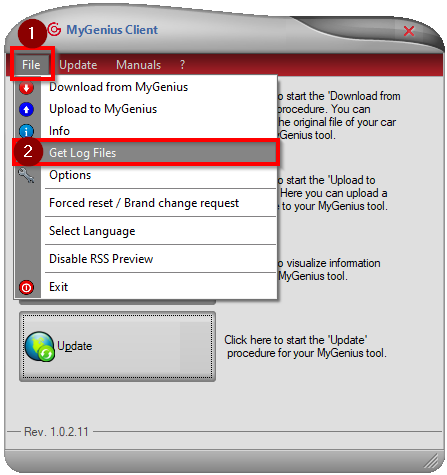
| 1. Click on "File" (1) -> "Get Log Files" (2) |
|
 |
|
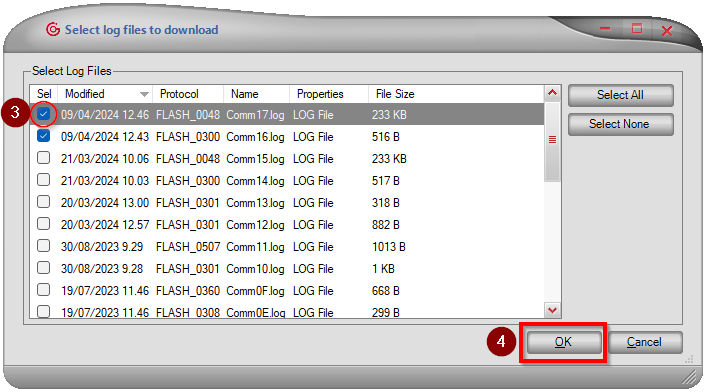
| 2. Select manually every single file (3) or click on the "Select All" button to select all log files saved on your tool, once selected all the Log files needed press "Ok" (4) |
|
 |
|
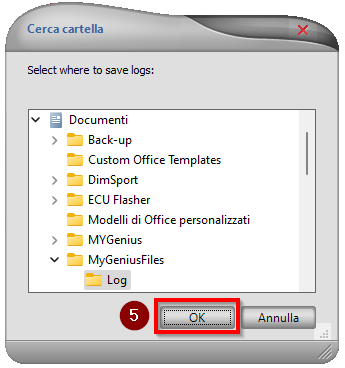
| 3. Select the desired folder and press "Ok" (5) |
|
 |
|
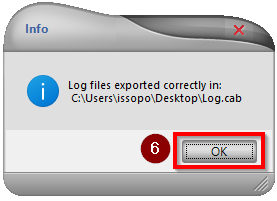
| 4. At the end of the exportation press "Ok" (6) |
|
 |
|
| 5. The software will create a LOG.cab file containing the previously selected Log files. |