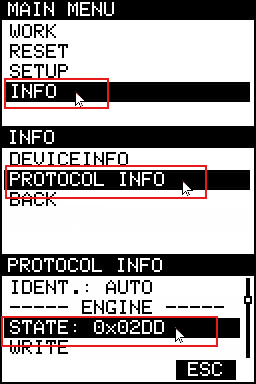
| From the 'MAIN MENU', select 'INFO', 'PROTOCOL INFO' and you will see the 'STATE' of your tool.
|
|  |
| | MAIN STATUS |
| VIRGIN 0x0000 ⇒ the device is not enabled to perform any operations. You may also see the message 'there is not any valid features' as the STATE of the device (see the link https://reserved.dimsport.com/kb/article.aspx?id=703). In this case, the Master has to initialize the tool before shipping it to the customer
|
| INITIALIZE 0x0044 ⇒ the device has been initialized by the Master, but it's not ready to work. The customer has to perform the required mandatory update. If no warning message about a mandatory update appears, follow this procedure in the My Genius Client software https://reserved.dimsport.com/kb/article.aspx?id=1744
|
| | CONFIGURED 0x0055 ⇒ the device is configured and ready to work. Connect the device to your vehicle and make an 'ID' or 'READING'. |
| | WRITE 0x02DD ⇒ the device has read the vehicle, and is ready to write a MOD file. |
| WRITE 0x07DD ⇒ the device has written a MOD file in the vehicle.
|
| WRITE 0x03DD ⇒ the device has restored the ORI file in the vehicle.
|
| RECOVERY 0x0266/0x0366 ⇒ the device has not completed the writing of the MOD/ORI file in the vehicle.
|
|