|
| In case the Stock windows antivirus prevents the execution of Dimsport softwares it will be necessary to add them to he exclusion list of the Windows Defender |
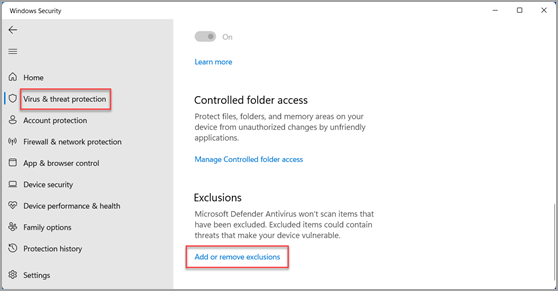
- Click on Start-->Settings-->Privacy & Security-->
- Under the section Virus & threat protection settings
- Click on "Add or remove exclusions"
- Select "Folder" and insert following path depending on the Software you have
|
ALL Softwares --> C:\Program Files (x86)\DimSport
Software Race Evo / Flashpoint --> C:\Race2000
|
|
|
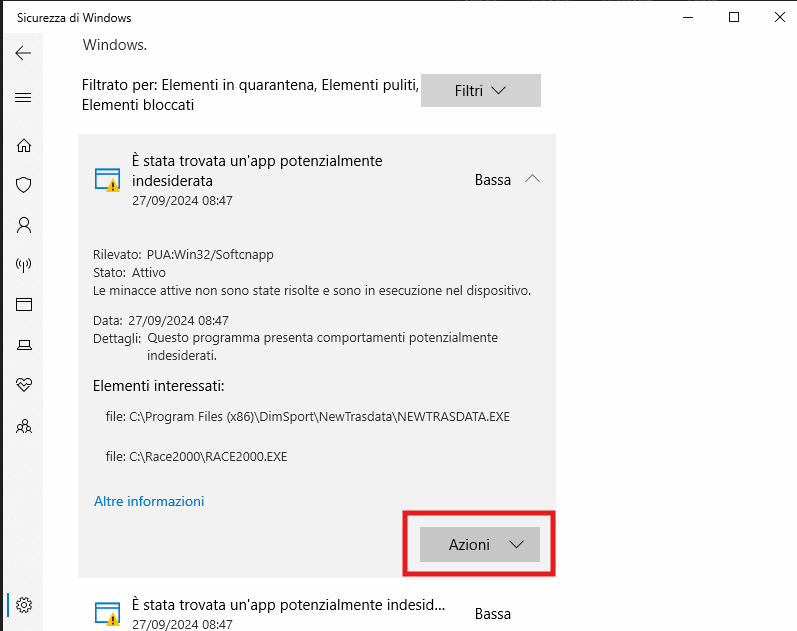
If the software has been already blocked it's necessary to consent it from the protection history
|
|
|
| Click on "Actions" then on "Allow" to allow the software to be executed |